
Omron Camera Integration
Connect and control Omron GigE cameras directly from the Visual Workflow Builder with three dedicated nodes for streaming, configuration, and triggering.
Getting images from industrial cameras into an AI inspection workflow has traditionally been one of the most time-consuming steps in any deployment. The Visual Workflow Builder now makes it simple with three ready-to-use nodes designed specifically for Omron GigE cameras.
What’s New
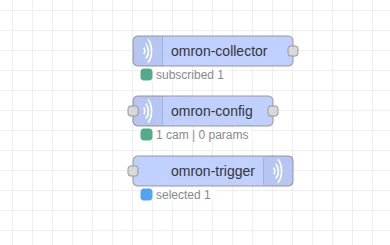
Three new drag-and-drop nodes bring native Omron camera support into the Visual Workflow Builder:
| Node | What it does |
|---|---|
| omron-collector | Connects to your cameras and streams live images into the workflow |
| omron-config | Adjusts camera settings like exposure and gain in real time |
| omron-trigger | Tells the camera when to capture a frame |
No coding, no external tools. Everything is managed visually from inside the workflow.
How They Work Together
A typical inspection workflow combines all three nodes in a simple sequence:
- omron-config sets the right camera parameters for the current lighting and product type.
- omron-trigger waits for a signal and tells the camera to capture a frame at the right moment.
- omron-collector streams the captured image to the next step.
Each node handles one job, keeping your workflow clean and easy to modify. Change your camera settings without touching the capture logic. Adjust your trigger timing without reconfiguring the image stream. Add more cameras without redesigning the workflow.
Omron GigE cameras join the growing list of industrial cameras supported natively in the Visual Workflow Builder.