
Train From Existing Model
Efficient fine-tuning: Leveraging legacy models to maintain performance with fewer images.
Training a vision model from scratch is reliable, but it can be data-hungry.
Now there is a faster option: train from an existing model instead of the default. This gives teams more ways to reach the target performance, especially when the new product is a close variation of something you already trained.
What “Train From Model” Means
Instead of starting with an empty model, the system loads a previously trained model checkpoint as the starting point.
The model already understands the general structure of the product family, so it can adapt to a new variant with fewer images and fewer training cycles.
Example: If you already trained a model for generic bottles, you can reuse it and fully orient it to a specific bottle shape, label layout, or cap style.
Why It Helps
| Benefit | What it changes |
|---|---|
| Faster results | Reach useful accuracy with less data |
| More stable accuracy | Stronger early performance while the dataset grows |
| Shorter pilot cycles | Validate feasibility before scaling |
When to Use It
- You already have a model for a similar product or packaging family
- The new SKU is a variation, not a completely new format
- You want to validate performance quickly with a smaller dataset
How to Enable It (Models V1 and V2 Only)
This option is available only for Models V1 and V2.
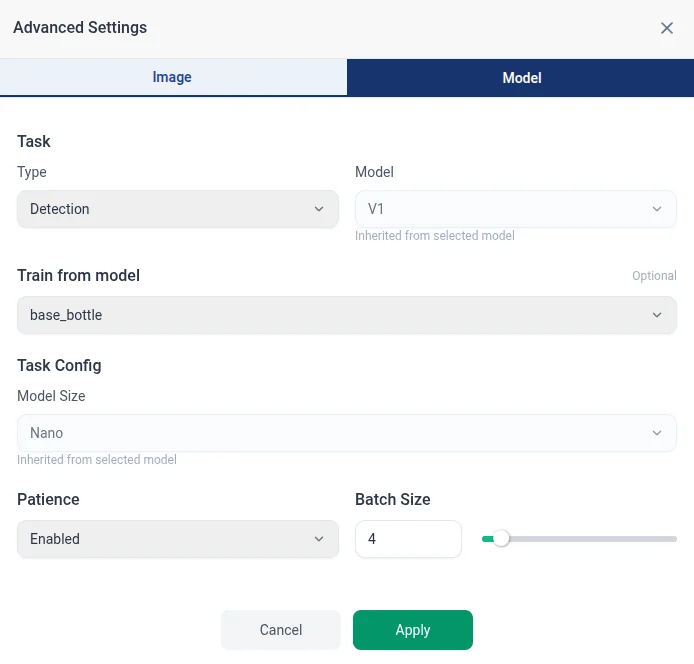
- Go to Production Training.
- Open Advanced settings.
- Under Model, in Train from model.
- Select the existing model you want to start from.
Remember
The best performance still comes from a representative dataset.
Training from an existing model is a way to get fast initial results, not a replacement for proper data coverage.