
Inference Optimizations: Maximizing GPU Utilization in Industrial AI
Learn how to optimize AI inference performance through batching, multi-model strategies, and TensorRT conversion for industrial vision applications.

Running AI models for industrial vision applications requires more than just a powerful GPU. Without proper optimization, even expensive hardware can sit mostly underutilized while processing images one at a time. Understanding how to maximize GPU utilization is essential for achieving the throughput industrial applications demand.
The Problem with Sequential Inference
When AI models process images one at a time (sequential inference), the GPU is rarely saturated. Modern GPUs contain thousands of cores designed for parallel computation, but single-image inference often fails to fully occupy the hardware.
In many real deployments, the bottleneck is not just raw inference speed, but also the overhead around it:
- CPU-side preprocessing
- Host-to-device memory transfers
- Kernel launch overhead
- Small workloads that cannot fill the GPU
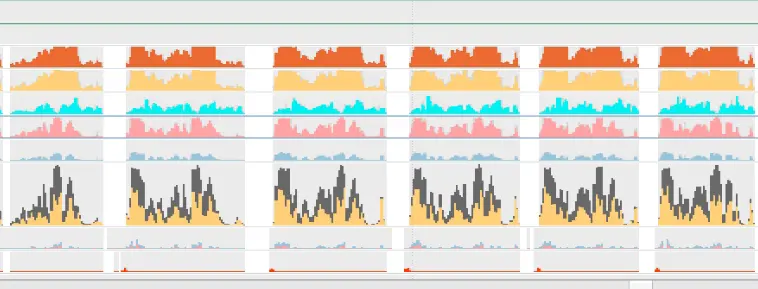
This leads to expensive hardware being significantly underutilized. As the GPU usage graph shows, sequential single-image inference fails to use the device to full potential.
Solution 1: Batching
Batching is the most straightforward way to improve GPU utilization. Instead of processing one image at a time, the model processes multiple images simultaneously.
Why Batching Works
GPUs excel at parallel operations. When you send a batch of 8 images instead of 1, the GPU can process them together using its thousands of cores. Processing a batch of 8 images often takes far less than 8× the time of a single image, resulting in dramatically improved throughput.
Dynamic Batching
In production environments, images don’t arrive in neat batches. Dynamic batching solves this by accumulating incoming images and triggering inference when either:
- A target batch size is reached (e.g., 8 images)
- A timeout expires (e.g., 50 milliseconds)
This approach balances throughput with latency. High-volume lines naturally form full batches, while lower-volume lines don’t wait indefinitely for images that might not arrive.
In hard real-time industrial systems, batching must be tuned carefully to avoid unpredictable latency jitter.
Implementation Considerations
- Memory constraints: Larger batches require more GPU memory. Monitor memory usage to find the optimal batch size for your hardware.
- Latency tradeoffs: Larger batches improve throughput but increase latency for individual images. Find the right balance for your application’s requirements.
- Variable image sizes: If your images vary in size, you may need to resize or pad them for consistent batch processing.
Solution 2: Multiple Models in Parallel
For applications requiring multiple AI models (e.g., defect detection plus classification), running models in parallel can significantly improve throughput.
How It Works
Instead of running Model A, then Model B sequentially, multiple models can share the GPU and overlap execution. This is particularly effective when:
- Models have different computational characteristics
- Multiple inspection tasks run on the same production line
- Different product types require different models
With careful scheduling and CUDA stream management, one model’s work can overlap with another’s data preparation or execution.
Benefits
- Better GPU utilization: While one model waits on data movement or preprocessing, another can compute
- Reduced total latency: Overlapped execution can deliver results faster than strict sequential runs
- Flexible architecture: Different inspection tasks can scale independently
Implementation Challenges
Running multiple models simultaneously requires careful resource management:
- GPU memory: Each model consumes memory. Monitor total usage to avoid out-of-memory errors.
- Scheduling: True concurrency depends on GPU occupancy and bandwidth. Poor scheduling can still serialize workloads.
- Error handling: Failures in one model shouldn’t crash the entire system.
Solution 3: TensorRT Conversion
TensorRT is NVIDIA’s optimization toolkit that converts standard AI models into highly optimized engines tuned for specific hardware configurations.
What TensorRT Does
TensorRT analyzes your model and applies multiple optimization techniques:
- Layer fusion: Combines multiple operations into single, optimized kernels
- Precision calibration: Uses FP16 or INT8 where appropriate to improve speed
- Kernel auto-tuning: Selects the fastest implementation for each operation on your specific GPU
- Memory optimization: Minimizes memory transfers and reuses buffers efficiently
Optimization Parameters
TensorRT engines are optimized for specific configurations:
- GPU architecture: Engines are usually tied to a GPU generation and software stack
- Image dimensions: Input size is often fixed at conversion time for maximum efficiency
- Batch size: Engines can be optimized for specific batch sizes or dynamic ranges
Tradeoffs
- Limited portability: Engines are not fully portable across different GPU architectures or driver/runtime versions
- Conversion time: Initial optimization can take several minutes
- Flexibility loss: Changing input sizes or batch ranges may require rebuilding
- Precision considerations: FP16 typically preserves accuracy, while INT8 may require calibration and can introduce small accuracy changes
When to Use TensorRT
TensorRT is ideal for production deployments where:
- Hardware is standardized and stable
- Maximum throughput is required
- Input dimensions are consistent
- Lower precision modes are acceptable
Solution 4: Overlap the Pipeline (Async Preprocessing + Transfers + Inference)
A lot of GPU “idle time” in industrial AI systems is not caused by slow inference, but by the pipeline around it. Preprocessing, memory transfers, and postprocessing can leave the GPU waiting between batches.
How It Works
Instead of running each step sequentially:
- CPU preprocess
- Transfer to GPU
- GPU inference
- Transfer back
- CPU postprocess
You overlap them so different stages run at the same time:
- CPU prepares batch N+1
- GPU runs inference on batch N
- CPU postprocesses batch N-1
This creates a continuous conveyor belt of work.
Key Techniques
- Asynchronous execution using CUDA streams
- Pinned (page-locked) memory for faster transfers
- Non-blocking H2D/D2H copies to overlap compute and I/O
Frameworks like NVIDIA Triton Inference Server implement this type of scheduling automatically.
Why It Helps
By keeping the GPU constantly fed with data, you eliminate gaps between inference calls and improve overall throughput without changing the model itself.
Solution 5: GPU-Accelerated Preprocessing
In many industrial vision systems, preprocessing can become a major bottleneck, especially with high-resolution cameras or multi-camera setups.
Operations like resizing, normalization, decoding, or lens correction can consume significant CPU time before inference even starts. JPEG decoding in particular is often a hidden throughput limiter.
What to Do
Move preprocessing workloads onto the GPU using optimized libraries:
- NVIDIA DALI for fast data loading, decoding, and augmentation
- CV-CUDA for GPU-accelerated computer vision operations
- VPI (Vision Programming Interface) for efficient vision pipelines
When It’s Worth It
GPU preprocessing is especially effective when:
- Input images are large (2K–8K resolution)
- Multiple cameras feed the same GPU
- Heavy geometric transforms are required (warp, undistort, rectification)
Benefits
- Reduced CPU bottlenecks
- Higher end-to-end throughput
- Better GPU utilization across the full pipeline
Considerations
- GPU preprocessing adds complexity to deployment
- Gains are highest when preprocessing is a significant fraction of total latency
Together, pipeline overlap and GPU preprocessing ensure that expensive hardware is not wasted waiting on CPU-side operations.
Combining Strategies
These optimization strategies work together synergistically:
- Convert to TensorRT for maximum per-inference efficiency
- Implement dynamic batching to maximize GPU occupancy
- Overlap preprocessing, transfers, and inference to remove pipeline gaps
- Move preprocessing onto the GPU to eliminate CPU bottlenecks
- Run multiple models in parallel when multiple inspection tasks are needed
A well-optimized system might process batches of 8 images through a TensorRT-optimized model while overlapping preprocessing and simultaneously running a secondary classification model, achieving throughput that would otherwise require multiple GPUs.
Measuring Success
Track these metrics to evaluate your optimizations:
- Throughput: Images processed per second
- GPU utilization: Percentage of GPU capacity in use (target 80%+)
- Latency: Time from image capture to result
- Memory usage: GPU memory consumption under load
Conclusion
Sequential inference wastes expensive GPU resources. Through batching, pipeline overlap, GPU preprocessing, parallel model execution, and TensorRT conversion, industrial AI systems can achieve dramatic throughput improvements without hardware upgrades.
Many modern edge deployments, including Rosepetal AI’s systems, integrate these optimizations so industrial teams get maximum performance from their hardware for real-time quality control. The result is faster inspection, better resource utilization, and lower cost per inspection across production lines.